Sarbajit Chakraborty on
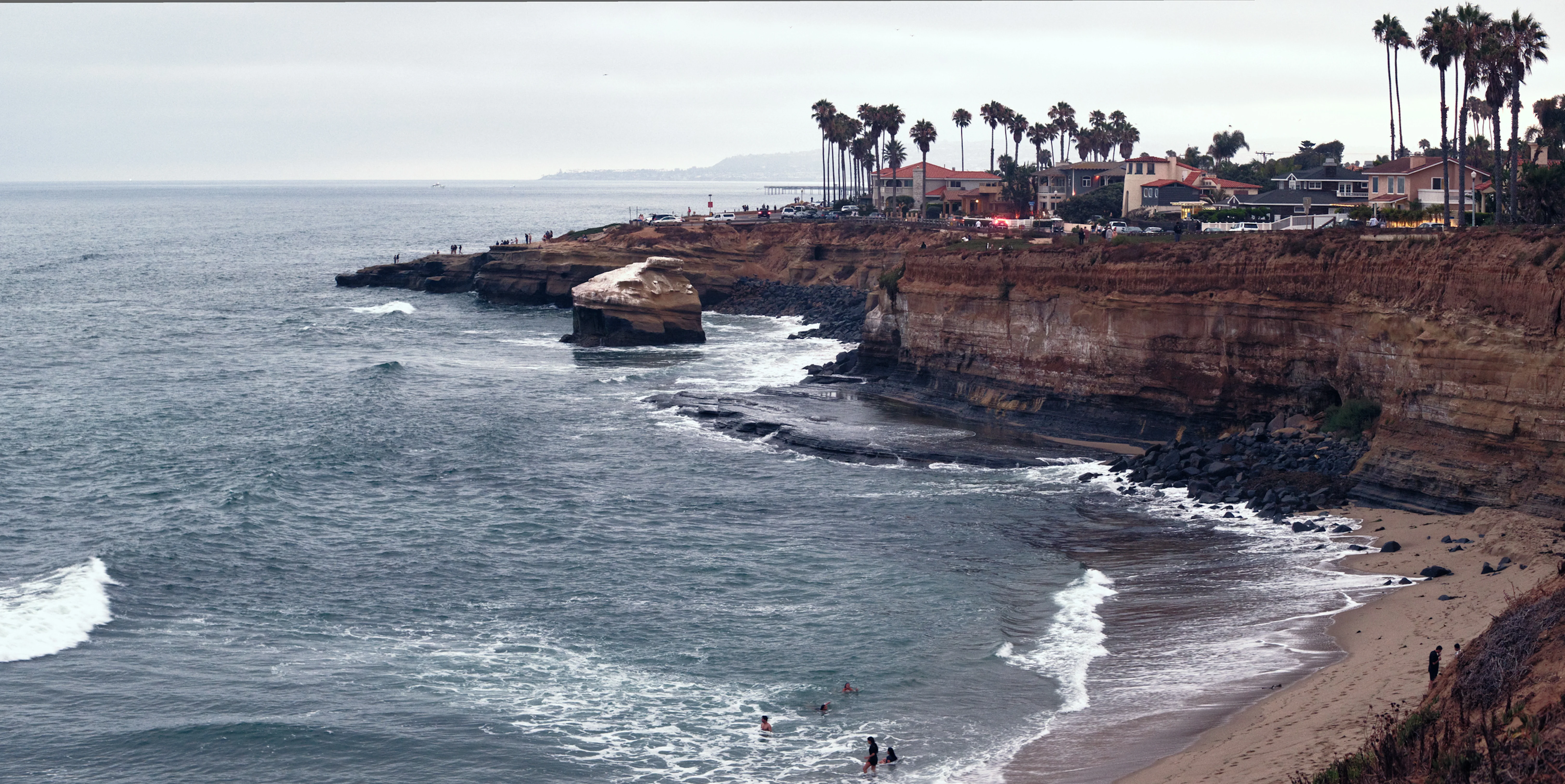
Based on all if your feedback, I re-edited the photo. It's still not perfect, but i think it's much better! Thanks a ton!!!
Posted by Sarbajit Chakraborty in General on the Big Photo Hunt community board, .
I feel like overcast days take colours out of an image completely. And I live in Seattle, so a constant problem. I have not figured out a way to correct for this.
The attached image was in San Diego, while the marine layer was coming in and covering the sun. And I can't figure out how to edit it properly to show how brick red the cliffs were, and blue the water was. Any suggestions?
Sarbajit Chakraborty on
Based on all if your feedback, I re-edited the photo. It's still not perfect, but i think it's much better! Thanks a ton!!!
Hayley Flint-ahern on
So I’m more or less self taught with a year of barely paid attention to AS photography at 6th form but i usually take images in the uk and it’s always bloody dreary here. I rely a lot on de hazing features like in lightroom as my editing program access is limited I’ll go through the edit in like a do a bit of this and that see what works maybe do a couple of edits and see what’s feeling more right. I think it’s just about where the depth needs to be and colour can be found if you can remove the haze. I also use the noise reduction features if I’m trying to enhance the colour saturation or depth.
Reducing whites and increasing black, using the tints to enhance certain colours with a colour theory in mind so if we want vibrant greens the more violet tints can help to improve that without using saturation adjustments. Colour wheels really help as well.
I’m typing all this on the fly I’m probably forgetting a bunch of things.
I’ll come back if I think of anything else groundbreaking!
Tony Kelts on
I would use snapseed. I would use the "Selective" tool and darken the sky and bump contrast on the sky. Then go to "tune image" and try some different looks until it looks right. The little bit of sky in this pic was almost white, I was able to get some detail and darker sky. Yes, we had a tree block our road.
Sarbajit Chakraborty on
@Tony Kelts - This is perfect. I have not used Snapseed before (though I have heard of it). I will give that a try! I love how much green you were able to get in the trees on an overcast day!
Ken Deckinger on
Hey Jeet - I'm no expert here at all (and I'm colorblind 😳) but I've been playing around with contrast on days like this. It seems to help create a little depth in images on these days and in turn pull out some of the colors. I have mostly done this in Lightroom Classic with the contrast slider and also the S-Curve. Not sure if it's right approach or not but it seems to help me a little bit.
Nisah Cheatham on
@Ken Deckinger Sarbajit - I second this approach as a baseline. I'm all about the Tone Curve and I grabbed a screen cap of this shot and simply applying a global S-ish curve brings out more colors in this image as posted. Also, stylisitically, think maybe think about something like what James Popsys does. He doesn't worry about blown out skies because you often just can't overcome that. https://www.youtube.com/@JamesPopsysPhoto
Sarbajit Chakraborty on
@Nisah Cheatham and @Ken Deckinger - You both are awesome! I will play around with the S curve and also blown out skies to see how i can make that happen! I so appreciate this feedback!!!!
Josh Hoffman on
We'll it depends on if your making a globalized or localized edit. If you really want to bring out the reds in the cliffs and the blues in the water, then I would do focused edits to just those areas so you can better control how they come out and you can get that pop of color you're looking for without over-saturating the whole image. I agree, though overcast days really do take a lot of color out of a evironment.
Sarbajit Chakraborty on
@Josh Hoffman would that mean using masks to edit? Sorry, for as long as I'm clicking pictures, editing is something I'm terrible at
Josh Hoffman on
@Sarbajit Chakraborty Yes, exactly. Using a mask to select only the cliffs, and another mask to select only the water. This will allow you to do localized edits to the two seperate masks and have better control of the detail, color, and brightness you want out of the image for those features.